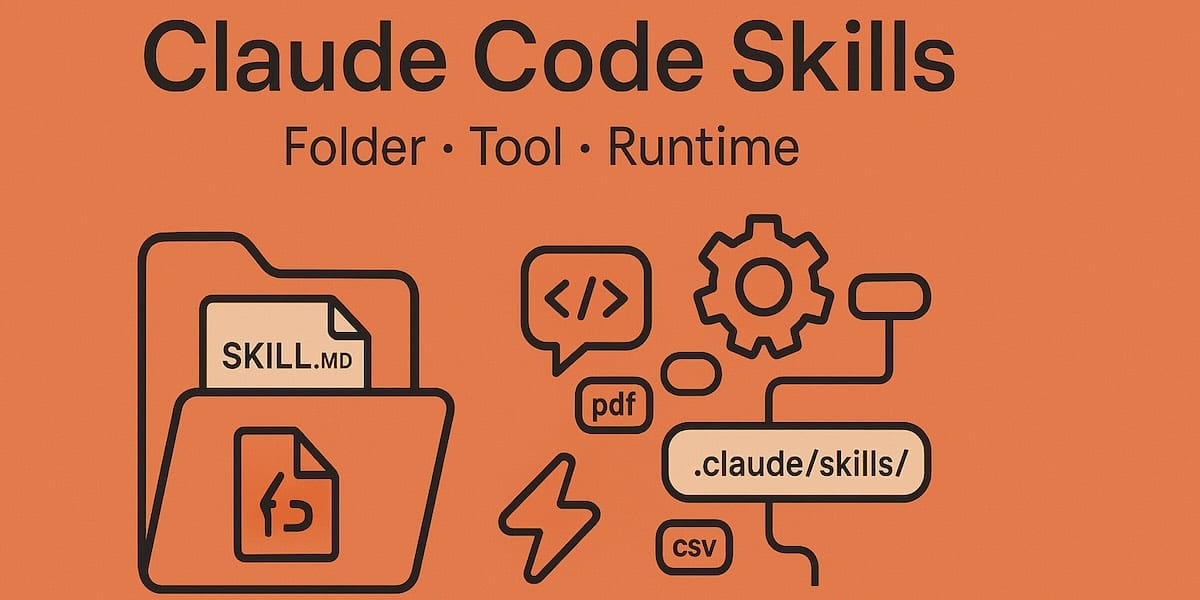
Skills have become one of the most used extension points in Claude Code. They're flexible, easy to make, and simple to distribute.
But this flexibility also makes it hard to know what works best. What types of skills are worth making? What's the secret to writing a good one? When do you share them with others?
We've been using skills in Claude Code extensively at Cloudify with hundreds in active use. These are the lessons we've learned about using skills to accelerate our development.
What Are Skills?
If you're new to skills, I'd recommend reading the official docs or watching the Agent Skills course on Skilljar. This post assumes some familiarity with skills.
A common misconception is that skills are "just markdown files." The most interesting part of skills is that they're not just text files — they're folders that can include scripts, assets, data, templates, and reference materials that the agent can discover, explore, and execute.
my-skill/
├── SKILL.md          # Required: YAML frontmatter + markdown instructions
├── scripts/          # Optional: executable code
├── references/       # Optional: API docs, schemas
├── assets/           # Optional: templates, examples
└── data/             # Optional: config files, lookup tables
In Claude Code, skills have a rich set of frontmatter configuration options — including tool restrictions, subagent execution, invocation control, and lifecycle hooks. We've found that some of the most interesting skills use these configuration options and folder structure creatively.
Since December 2025, Agent Skills have also been published as an open standard for cross-platform portability. The same skill works across Claude Code, Claude.ai, the Claude API, and other compatible AI tools — so the investment you make in writing good skills pays off across surfaces.
Types of Skills
After cataloging all of our skills, we noticed they cluster into a few recurring categories. The best skills fit cleanly into one; the more confusing ones straddle several. This isn't a definitive list, but it's a good way to think about whether you're missing any inside your org.
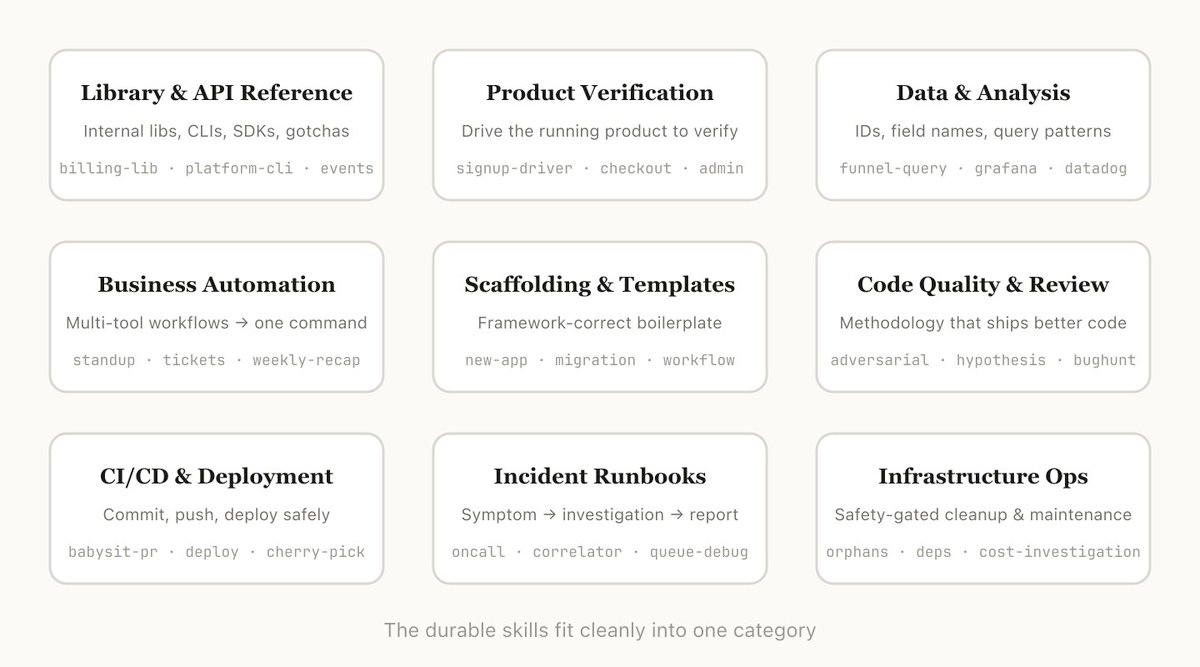
1. Library & API Reference
Skills that explain how to correctly use a library, CLI, or SDK. These can cover both internal libraries and common ones that Claude Code sometimes has trouble with. They often include a folder of reference code snippets and a list of gotchas for Claude to avoid when writing code.
Examples:
- billing-lib — your internal billing library: edge cases, footguns, etc.
- internal-platform-cli — every subcommand of your internal CLI wrapper with examples on when to use them
- frontend-design — make Claude better at your design system
These skills work well with user-invocable: false so Claude automatically loads them as background knowledge when it detects relevant work, without cluttering the slash command menu.
2. Product Verification
Skills that describe how to test or verify that your code is working. These are often paired with an external tool like Playwright, tmux, etc. for doing the verification.
Verification skills are extremely useful for ensuring Claude's output is correct. It can be worth having an engineer spend a week just making your verification skills excellent.
Consider techniques like having Claude record a video of its output so you can see exactly what it tested, or enforcing programmatic assertions on state at each step. These are often done by including a variety of scripts in the skill folder.
Examples:
- signup-flow-driver — runs through signup → email verify → onboarding in a headless browser, with hooks for asserting state at each step
- checkout-verifier — drives the checkout UI with Stripe test cards, verifies the invoice actually lands in the right state
- tmux-cli-driver — for interactive CLI testing where the thing you're verifying needs a TTY
3. Data Fetching & Analysis
Skills that connect to your data and monitoring stacks. These might include libraries to fetch data with credentials, specific dashboard IDs, etc. as well as instructions on common workflows or ways to get data.
Examples:
- funnel-query — "which events do I join to see signup → activation → paid" plus the table that actually has the canonical user_id
- cohort-compare — compare two cohorts' retention or conversion, flag statistically significant deltas, link to the segment definitions
- grafana — datasource UIDs, cluster names, problem → dashboard lookup table
4. Business Process & Team Automation
Skills that automate repetitive workflows into one command. These are usually fairly simple instructions but might have more complicated dependencies on other skills or MCPs. For these skills, saving previous results in log files can help the model stay consistent and reflect on previous executions.
Examples:
- standup-post — aggregates your ticket tracker, GitHub activity, and prior Slack posts → formatted standup, delta-only
- create-ticket — enforces schema (valid enum values, required fields) plus post-creation workflow (ping reviewer, link in Slack)
- weekly-recap — merged PRs + closed tickets + deploys → formatted recap post
Use disable-model-invocation: true on skills that post externally (Slack, ticketing systems) so Claude never fires them without your explicit command.
5. Code Scaffolding & Templates
Skills that generate framework boilerplate for a specific function in your codebase. You might combine these with scripts that can be composed. They are especially useful when your scaffolding has natural language requirements that can't be purely covered by code.
Examples:
- new-workflow — scaffolds a new service/workflow/handler with your annotations
- new-migration — your migration file template plus common gotchas
- create-app — new internal app with your auth, logging, and deploy config pre-wired
6. Code Quality & Review
Skills that enforce code quality and help review code. These can include deterministic scripts or tools for maximum robustness. You may want to run these automatically as part of hooks or inside a GitHub Action.
Examples:
- adversarial-review — spawns a fresh-eyes subagent to critique, implements fixes, iterates until findings degrade to nitpicks
- code-style — enforces code style, especially styles that Claude does not do well by default
- testing-practices — instructions on how to write tests and what to test
Skills like adversarial-review are great candidates for context: fork — the review subagent works in its own isolated context without polluting the main conversation, and returns only its summary of findings.
7. CI/CD & Deployment
Skills that help you fetch, push, and deploy code. These skills may reference other skills to collect data.
Examples:
- babysit-pr — monitors a PR → retries flaky CI → resolves merge conflicts → enables auto-merge
- deploy-service — build → smoke test → gradual traffic rollout with error-rate comparison → auto-rollback on regression
- cherry-pick-prod — isolated worktree → cherry-pick → conflict resolution → PR with template
Always use disable-model-invocation: true on deployment skills. You never want Claude deciding to deploy because your code looks ready.
8. Runbooks
Skills that take a symptom (such as a Slack thread, alert, or error signature), walk through a multi-tool investigation, and produce a structured report.
Examples:
- service-debugging — maps symptoms → tools → query patterns for your highest-traffic services
- oncall-runner — fetches the alert → checks the usual suspects → formats a finding
- log-correlator — given a request ID, pulls matching logs from every system that might have touched it
9. Infrastructure Operations
Skills that perform routine maintenance and operational procedures — some of which involve destructive actions that benefit from guardrails.
Examples:
- resource-orphans — finds orphaned pods/volumes → posts to Slack → soak period → user confirms → cascading cleanup
- dependency-management — your org's dependency approval workflow
- cost-investigation — "why did our storage/egress bill spike" with the specific buckets and query patterns
For skills with destructive potential, combine disable-model-invocation: true with allowed-tools to restrict what Claude can do:
---
name: resource-orphans
description: Find and clean up orphaned cloud resources
disable-model-invocation: true
allowed-tools: Bash, Read, Grep, Glob
---
Tips for Making Skills
Once you've decided on the skill to make, how do you write it? These are some of the best practices, tips, and tricks we've found.
We also recently released Skill Creator to make it easier to create skills in Claude Code. Type /skill-creator and describe what you want — it will interview you, write a draft, generate test prompts, and help you iterate.
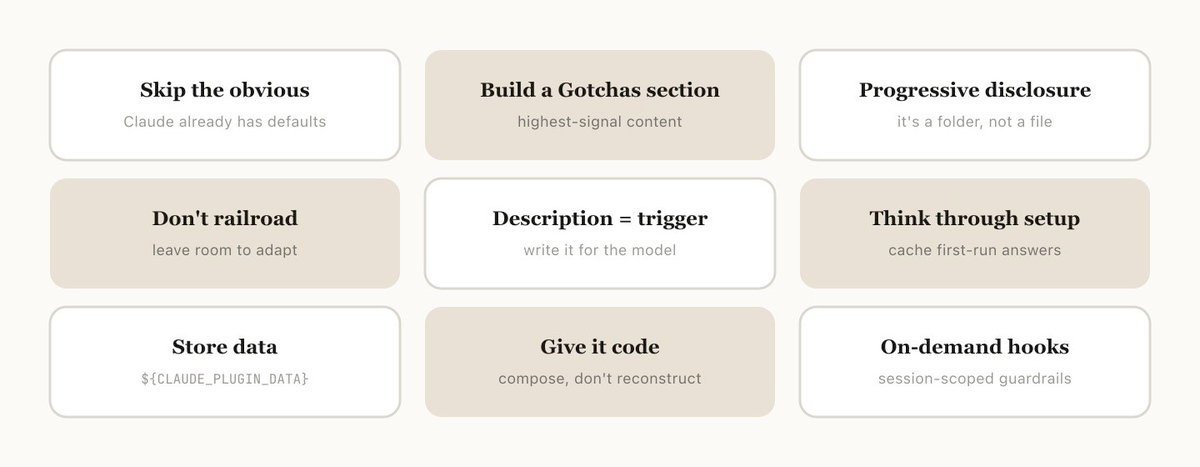
Don't State the Obvious
Claude Code knows a lot about your codebase, and Claude knows a lot about coding, including many default opinions. If you're publishing a skill that is primarily about knowledge, try to focus on information that pushes Claude out of its normal way of thinking.
The frontend design skill is a great example — it was built by iterating with customers on improving Claude's design taste, avoiding classic patterns like the Inter font and purple gradients.
Build a Gotchas Section
The highest-signal content in any skill is the Gotchas section. These sections should be built up from common failure points that Claude runs into when using your skill. Ideally, you'll update your skill over time to capture these gotchas.
## Gotchas

- **Never** call `billing.charge()` without checking `user.hasPaymentMethod` first —
  the SDK throws an unrecoverable error instead of returning a failure.
- The `currency` field expects ISO 4217 codes, not display names.
  Claude often writes "dollars" instead of "USD".
- Retry logic is built into the client. Wrapping calls in your own retry
  loop causes duplicate charges.
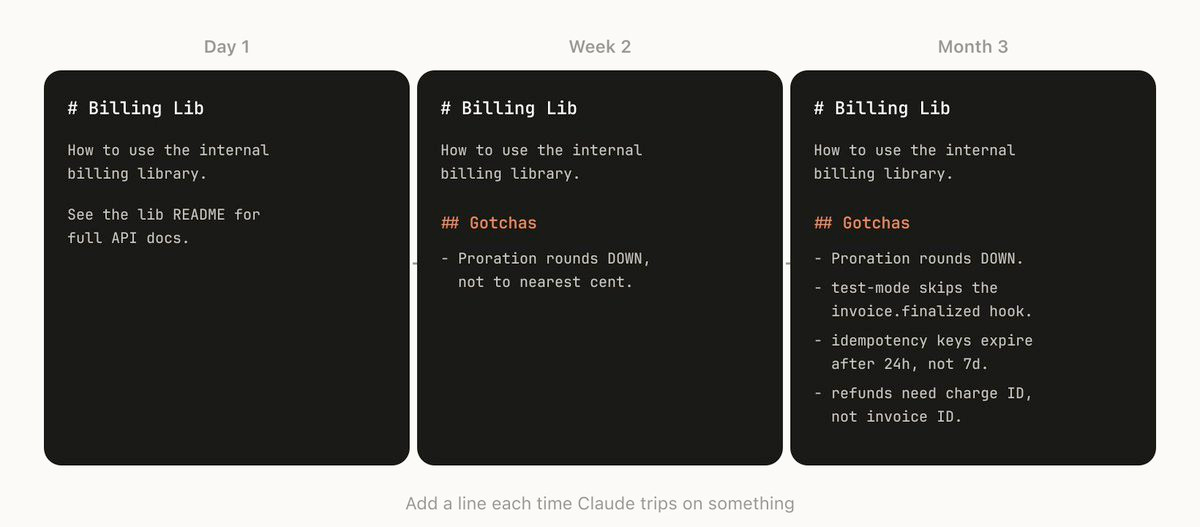
A strong gotchas section is the fastest way to improve a skill. Every time Claude gets something wrong, add it.
Use the File System & Progressive Disclosure
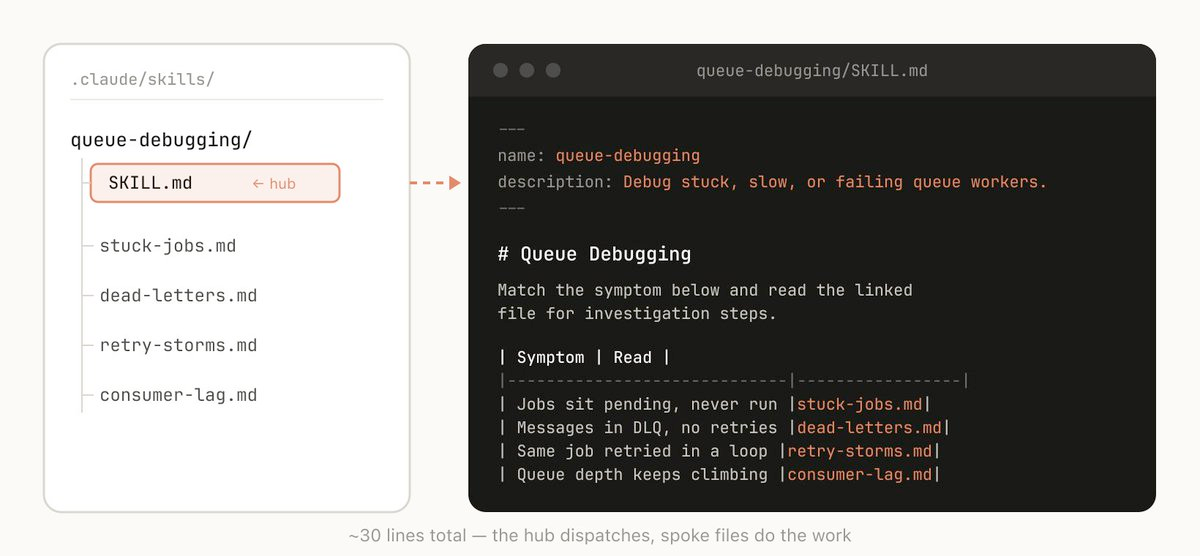
A skill is a folder, not just a markdown file. Think of the entire file system as a form of context engineering and progressive disclosure. Tell Claude what files are in your skill, and it will read them at appropriate times.
The simplest form of progressive disclosure is to point to other markdown files for Claude to use. For example, you may split detailed function signatures and usage examples into references/api.md.
Other examples:
- If your end output is a markdown file, include a template in
assets/to copy and use - Keep rarely needed but detailed reference material in separate files Claude reads only when relevant
- Include example scripts that demonstrate correct usage patterns
This approach directly reduces token usage — Claude loads only what it needs, when it needs it, rather than consuming everything upfront.
## Reference Files

- `references/api.md` — complete function signatures and return types
- `references/error-codes.md` — every error code this service can return
- `scripts/validate.sh` — run this after making changes to verify correctness
- `assets/template.md` — output template to copy and fill in

Read these files as needed for your current task. Do not read them all upfront.
Avoid Railroading Claude
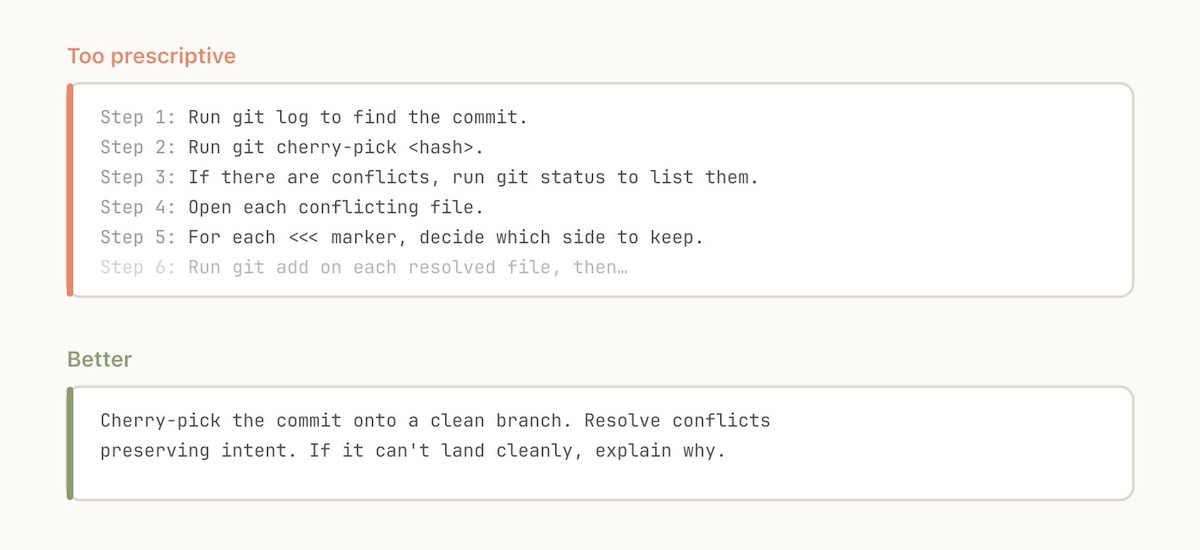
Claude will generally try to stick to your instructions, and because skills are so reusable you'll want to be careful of being too specific. Give Claude the information it needs, but give it the flexibility to adapt to the situation.
# ❌ Too rigid
1. Open the file at src/api/handlers.ts
2. Find the function named processOrder
3. Add a try-catch block around lines 45-60
4. Log the error with console.error

# ✅ Flexible
When fixing error handling in API handlers:
- Ensure all database operations have proper error handling
- Use the project's ErrorHandler utility (see references/error-handling.md)
- Log errors with enough context to debug in production
- Preserve the original error chain
Think Through the Setup
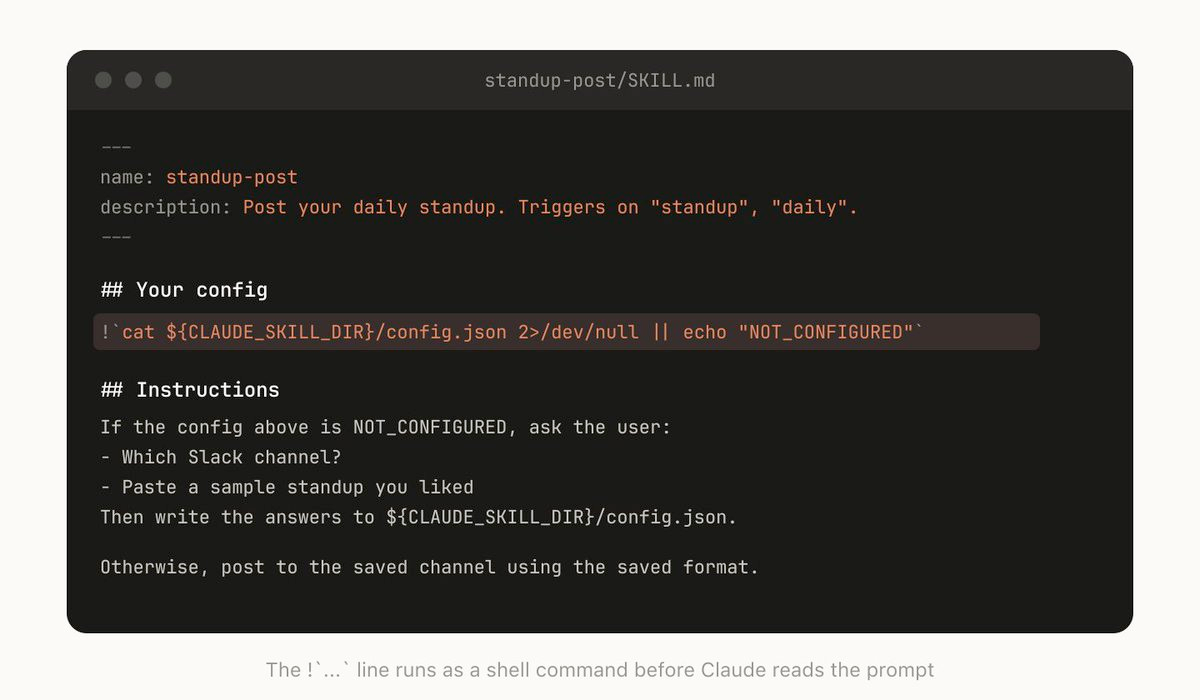
Some skills need context from the user before they can work. For example, a skill that posts your standup to Slack needs to know which channel to post in.
A good pattern is to store this setup information in a config file — but use ${CLAUDE_PLUGIN_DATA} for anything that should persist across plugin updates, not the skill directory itself.
## Setup

Check if `${CLAUDE_PLUGIN_DATA}/config.json` exists. If not, ask the user:
1. Which Slack channel should standups go to?
2. What's their GitHub username for activity lookup?
3. What ticket system should be checked? (Jira, Linear, etc.)

Save their answers to `${CLAUDE_PLUGIN_DATA}/config.json` for future runs.
Key environment variables for skill authors:
${CLAUDE_PLUGIN_DATA}— persistent data directory that survives plugin updates; use for config, logs, state${CLAUDE_PLUGIN_ROOT}— the plugin's install directory; changes on each update; use for referencing bundled scripts
The Description Field Is for the Model
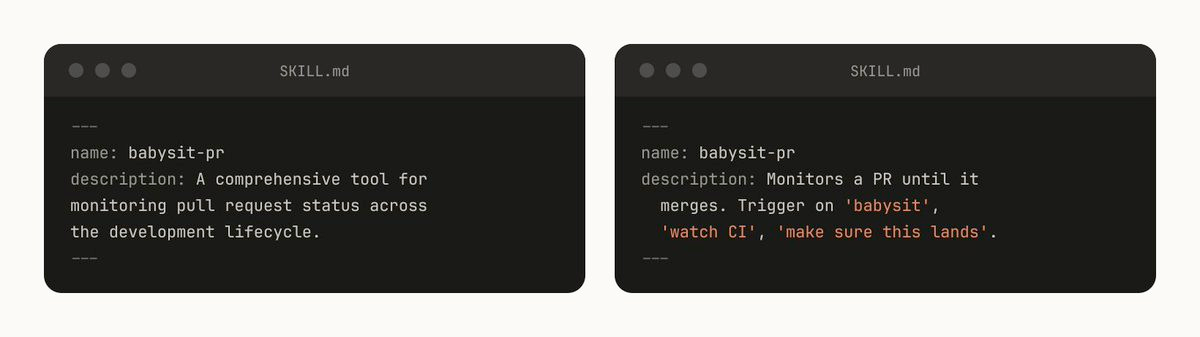
When Claude Code starts a session, it builds a listing of every available skill with its description. This listing is what Claude uses — via semantic reasoning, not keyword matching — to decide "is there a skill for this request?" The description field is not a summary. It's a trigger specification.
# ❌ Bad — too vague, will trigger unpredictably
description: Helps with code

# ❌ Bad — describes what it is, not when to use it
description: A collection of deployment scripts

# ✅ Good — describes both what and when
description: >
  Deploy the application to staging or production.
  Use when the user asks to deploy, ship, release,
  push to prod, or promote a build.
Important budget constraint: All skill descriptions share a character budget of 2% of the context window (with a fallback of 16,000 characters). If you have many skills, their descriptions may exceed this budget and some will be silently excluded. Run /context to check for warnings. You can override the limit with the SLASH_COMMAND_TOOL_CHAR_BUDGET environment variable, but the better fix is shorter, more precise descriptions.
Control Invocation Carefully
By default, both you and Claude can invoke any skill. Two frontmatter fields let you restrict this:
disable-model-invocation: true — Only you can invoke the skill via /skill-name. Use for workflows with side effects:
---
name: deploy
description: Deploy the application to production
disable-model-invocation: true
---
user-invocable: false — Hides the skill from the slash command menu but Claude can still auto-load it as background knowledge. Use for reference material that isn't an action:
---
name: legacy-auth-context
description: How the legacy auth system works. Use when working on auth-related code.
user-invocable: false
---
Use Subagents for Heavy Work
Add context: fork to your frontmatter when you want a skill to run in isolation. The skill content becomes the prompt driving a subagent — it won't have access to your conversation history, which keeps your main context clean.
---
name: deep-research
description: Thoroughly investigate a topic in the codebase
context: fork
agent: Explore
---
Investigate $ARGUMENTS thoroughly:
1. Find relevant files with Glob and Grep
2. Read and analyze the code
3. Summarize findings with specific file references
This is especially useful for research, code review, and analysis tasks that would fill your main context window. The subagent works in its own space and returns only the summary.
Caveat: context: fork only makes sense for skills with explicit instructions and a clear task. If your skill contains guidelines like "use these API conventions" without a task, the subagent receives the guidelines but no actionable prompt and returns without meaningful output.
Accept Arguments
Skills can accept arguments via the $ARGUMENTS placeholder, plus positional arguments ($0, $1, $2):
---
name: migrate-component
description: Migrates a component from one framework to another
---
Migrate the component $0 from $1 to $2.
Preserve all existing behavior and tests.
Running /migrate-component SearchBar React Vue replaces $0 with SearchBar, $1 with React, and $2 with Vue.
You can also use !command`` syntax to inject shell output directly into the skill prompt before Claude sees it:
---
name: pr-summary
description: Summarize changes in a pull request
context: fork
agent: Explore
---
Here is the PR diff:
!`gh pr diff $ARGUMENTS`

Summarize the key changes and flag any concerns.
Memory & Storing Data
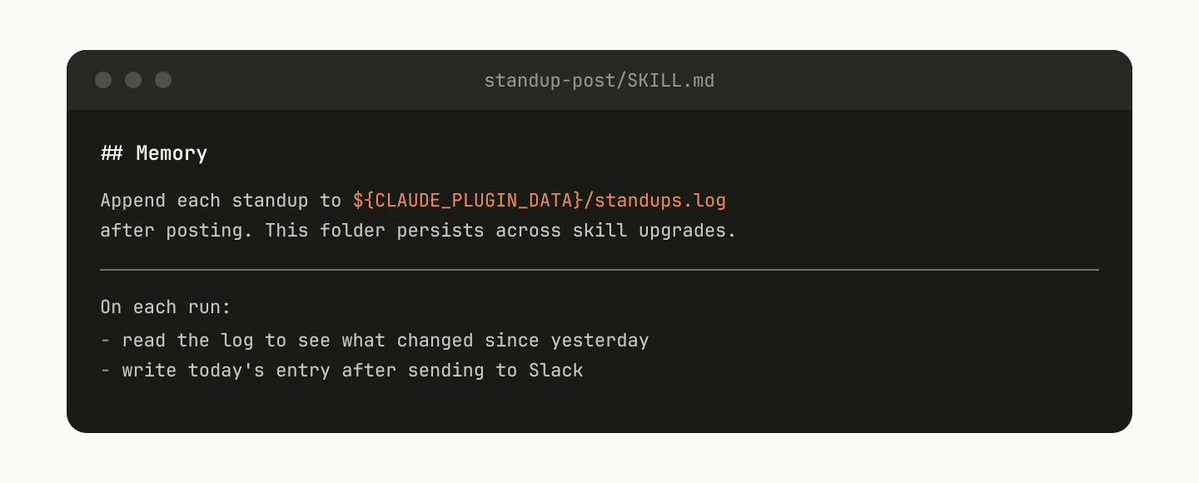
Some skills can include a form of memory by storing data within them. You could store data in anything as simple as an append-only text log file or JSON, or as complicated as a SQLite database.
For example, a standup-post skill might keep a standups.log with every post it's written, meaning the next time you run it, Claude reads its own history and can tell what's changed since yesterday.
Always store persistent data in ${CLAUDE_PLUGIN_DATA}, not in the skill directory. Data in the skill directory is deleted when you upgrade the plugin.
## History

Append a timestamped entry to `${CLAUDE_PLUGIN_DATA}/standups.log` after each post.
Read the log at the start of each run to identify what changed since the last standup.
Store Scripts & Generate Code
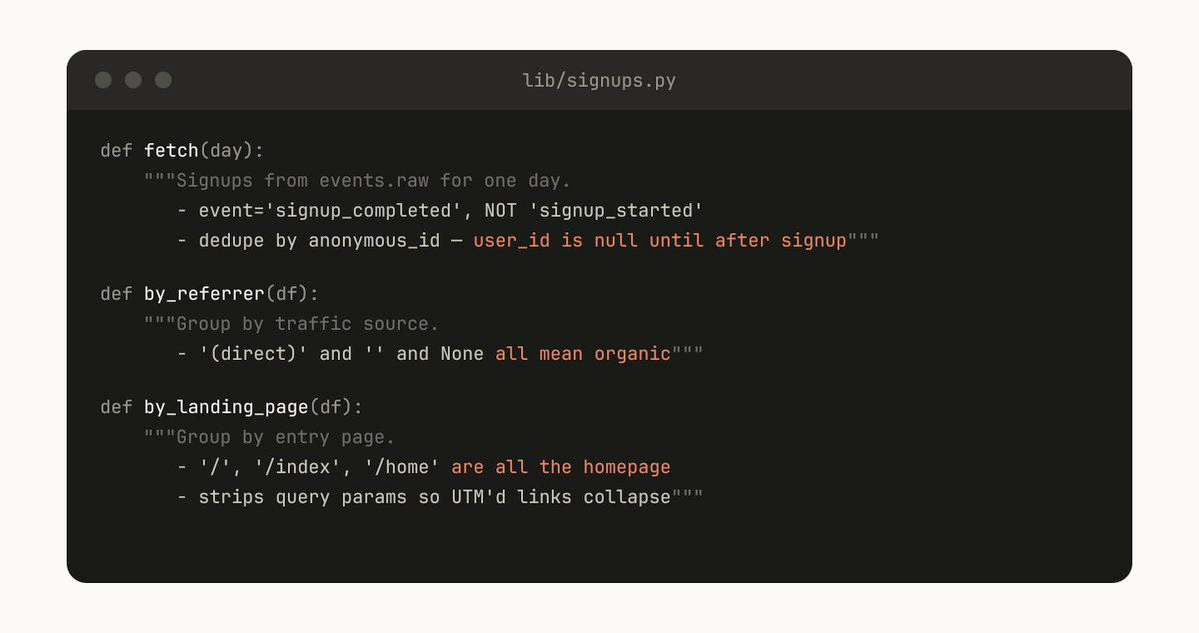
One of the most powerful things you can give Claude is code. Giving Claude scripts and libraries lets Claude spend its turns on composition — deciding what to do next rather than reconstructing boilerplate.
For example, a data science skill might include a library of helper functions to fetch data from your event source:
# scripts/events.py
def get_events(event_type, start_date, end_date):
    """Fetch events from the warehouse. Returns a pandas DataFrame."""
    ...

def get_user_journey(user_id):
    """Get the full event timeline for a user."""
    ...

def compare_cohorts(cohort_a_filter, cohort_b_filter, metric):
    """Compare a metric between two cohorts with statistical significance."""
    ...
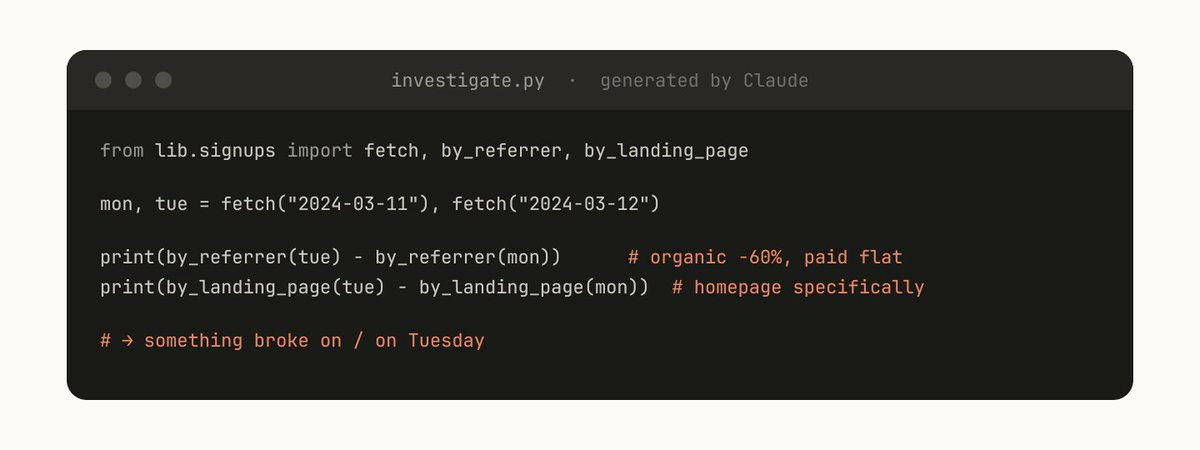
Claude can then generate scripts on the fly that compose these functions for prompts like "What happened on Tuesday?" — importing your helpers and focusing on analysis rather than data plumbing.
On-Demand Hooks
Skills can include hooks in their frontmatter that activate only when the skill is loaded and last for the duration of the session. Use this for opinionated hooks that you don't want running all the time.
---
name: careful
description: Enable safety guards for production work
disable-model-invocation: true
hooks:
  PreToolUse:
    - matcher: "Bash"
      hooks:
        - type: command
          command: "./scripts/safety-check.sh"
---
Production safety mode enabled. The following are blocked:
- rm -rf
- DROP TABLE
- git push --force
- kubectl delete
More examples:
- /careful — blocks destructive commands via a PreToolUse matcher on Bash. You only want this when you're touching prod — having it always on would drive you insane.
- /freeze — blocks any Edit/Write that's not in a specific directory. Useful when debugging: "I want to add logs but I keep accidentally 'fixing' unrelated code."
Distributing Skills
One of the biggest benefits of skills is sharing them with your team. There are several paths depending on your team's size and needs.
Project Skills (Checked into the Repo)
Place skills in .claude/skills/ in your repo. They're version controlled and everyone on the team gets them on pull.
.claude/skills/
├── code-style/
│   └── SKILL.md
├── deploy/
│   ├── SKILL.md
│   └── scripts/
│       └── deploy.sh
└── review/
    ├── SKILL.md
    └── references/
        └── checklist.md
This works well for smaller teams working across relatively few repos. But every skill that's checked in adds to the model's context budget. Keep descriptions concise.
Personal Skills
Place skills in ~/.claude/skills/ for utilities that are personal to you and shouldn't be in version control — cross-project helpers, your preferred formatting, personal workflow automations.
Plugins & Marketplaces
For larger teams, plugins bundle skills (along with hooks, commands, agents, and MCP configs) into distributable packages via GitHub-based marketplaces:
# Add a marketplace
/plugin marketplace add anthropics/claude-code

# Install a plugin from a marketplace
/plugin install plugin-name@marketplace-name

# Install from a local directory
/plugin add /path/to/local-plugin
An internal plugin marketplace lets your team decide which skills to install rather than loading every skill into every context.
Enterprise Admin-Managed Skills
Since December 2025, admins can deploy skills workspace-wide with automatic updates and centralized management. When skills share the same name across levels, the hierarchy follows most-specific-to-most-general override logic: Enterprise > Personal > Project.
API & Claude.ai
Custom skills can also be uploaded as zip files through Settings > Features in Claude.ai (available on Pro, Max, Team, and Enterprise plans), or via the /v1/skills API endpoint with the skills-2025-10-02 beta header.
Managing a Marketplace
How do you decide which skills go in a marketplace? How do people submit them?
We don't have a centralized team that decides; instead we try to find the most useful skills organically. If you have a skill that you want people to try out, upload it to a sandbox folder in GitHub and point people to it in Slack or other forums.
Once a skill has gotten traction (which is up to the skill owner to decide), they can put in a PR to move it into the marketplace.
A note of warning: it's easy to create bad or redundant skills, so having some method of curation before release is important.
Composing Skills
You may want skills that depend on each other. For example, a CSV generation skill that makes a CSV and then calls a file upload skill. This sort of dependency management is not natively built into marketplaces or skills yet, but you can reference other skills by name and Claude will invoke them if they're installed.
With the introduction of Agent Teams (February 2026), you can also orchestrate multi-skill workflows where multiple Claude sessions coordinate in parallel — one agent generates data while another formats the report, for example.
Measuring Skills
To understand how a skill is performing, we use a PreToolUse hook that logs skill usage within the company. This lets us find skills that are popular or are undertriggering compared to expectations.
The full set of hook events available for measurement:
- SessionStart / SessionEnd — track session-level skill usage
- PreToolUse / PostToolUse — log which skills are invoked and how they perform
- UserPromptSubmit — analyze what prompts trigger (or fail to trigger) skills
- Stop / SubagentStop — measure skill completion
- Notification — capture alerts and outcomes
Check for a warning with /context if you suspect skills are being excluded from the context budget.
Quick Reference: Frontmatter Fields
Every skill is configured through YAML frontmatter at the top of SKILL.md. All fields are optional; only description is strongly recommended.
| Field | Purpose |
|---|---|
name |
Slash command name and identifier |
description |
Tells Claude when to auto-load the skill (the trigger) |
disable-model-invocation |
true = user-only via slash command; Claude can't auto-trigger |
user-invocable |
false = hidden from / menu; Claude can still auto-load it |
allowed-tools |
Restrict which tools Claude can use (e.g., Read, Grep, Glob) |
context |
fork = run in isolated subagent context |
agent |
Subagent type when forked (e.g., Explore) |
model |
Override model selection for this skill |
hooks |
Lifecycle hooks scoped to the skill's execution |
version |
Version tracking metadata |
mode |
true = show in "Mode Commands" section (e.g., debug-mode) |
argument-hint |
Hint text for expected arguments |
license |
License metadata |
compatibility |
Cross-platform compatibility info (Agent Skills standard) |
metadata |
Arbitrary key-value metadata |
Conclusion
Skills are incredibly powerful, flexible tools for agents, but it's still early and we're all figuring out how to use them best.
Think of this more as a grab bag of useful tips that we've seen work than a definitive guide. The best way to understand skills is to get started, experiment, and see what works for you. Most of ours began as a few lines and a single gotcha, and got better because people kept adding to them as Claude hit new edge cases.
A few parting principles:
- Start simple. Your first skill can be 10 lines. You don't need complex frontmatter, supporting files, or forked subagents. Start with instructions you'd copy-paste manually, put them in a
SKILL.md, and evolve from there. - Iterate from failures. Every time Claude gets something wrong, add it to the gotchas. The best skills are the ones that have been refined through real usage.
- Respect the context budget. Keep descriptions precise and skill content progressive. Let Claude load what it needs, when it needs it.
- Control side effects. Use
disable-model-invocation: truefor anything that touches the outside world. Deterministic hooks for anything that must always happen. - Share what works. Check project skills into your repo, publish personal wins as plugins, and build up your team's collective expertise one skill at a time.